Your family, one warm screen

The family calendar, the kids' chores and rewards, this week's dinners, a playroom with learning games, the week's weather and a calm sleep screen, on the old iPad already in your kitchen. Set it up your way.

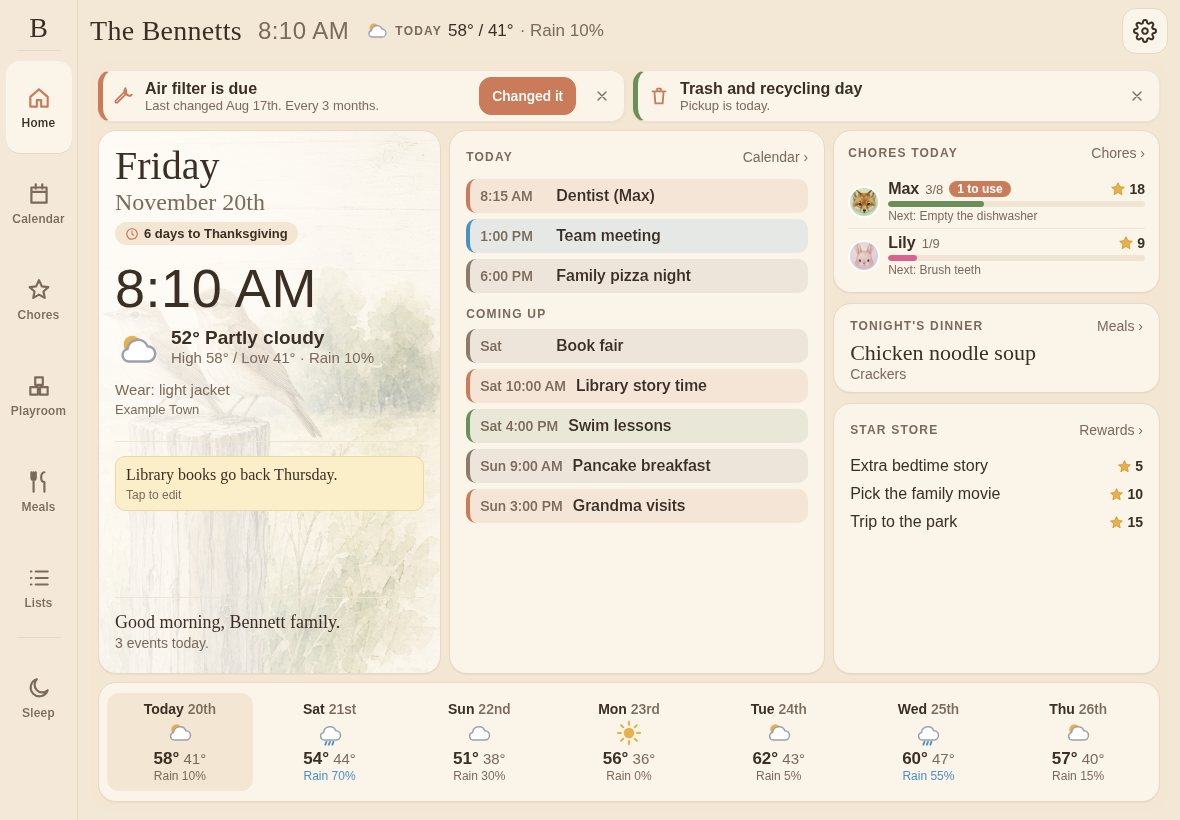
Home screen with today's plan, tonight's dinner, the kids' chores and a 7-day forecast
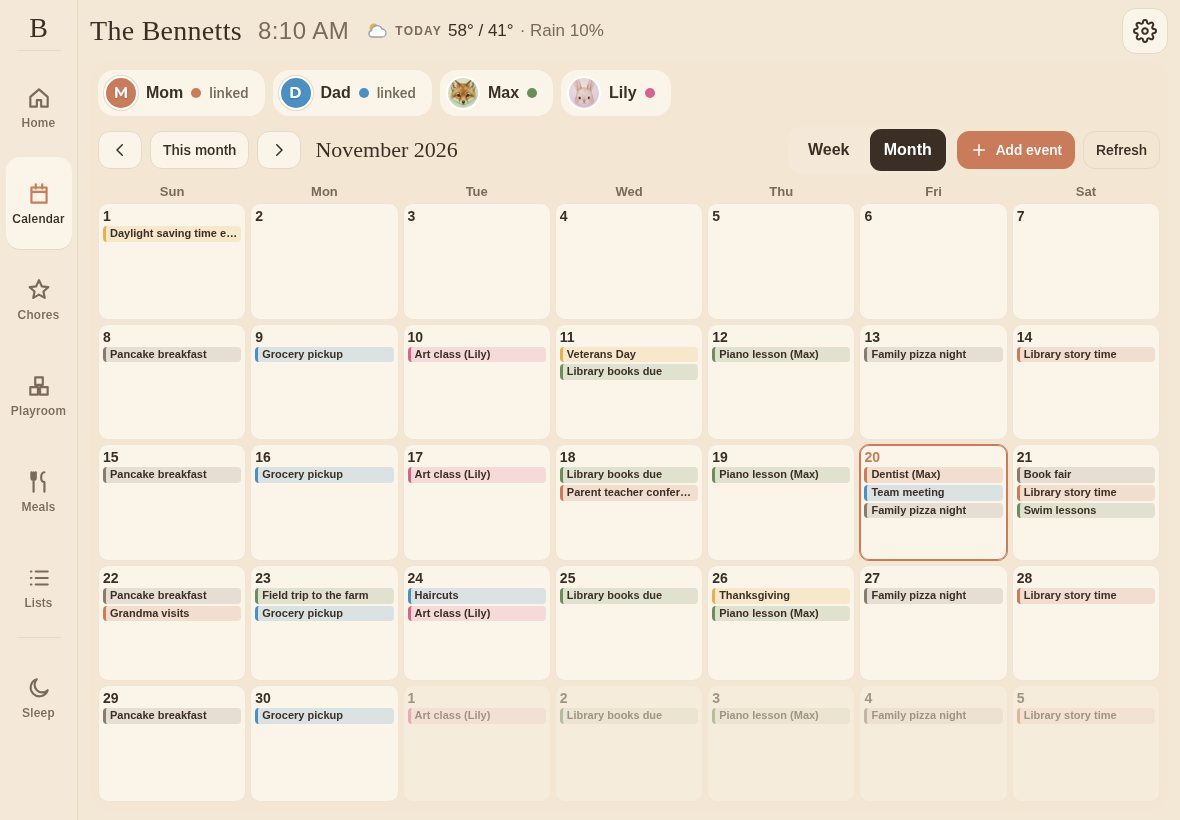
Shared family calendar, month view, color-coded by person
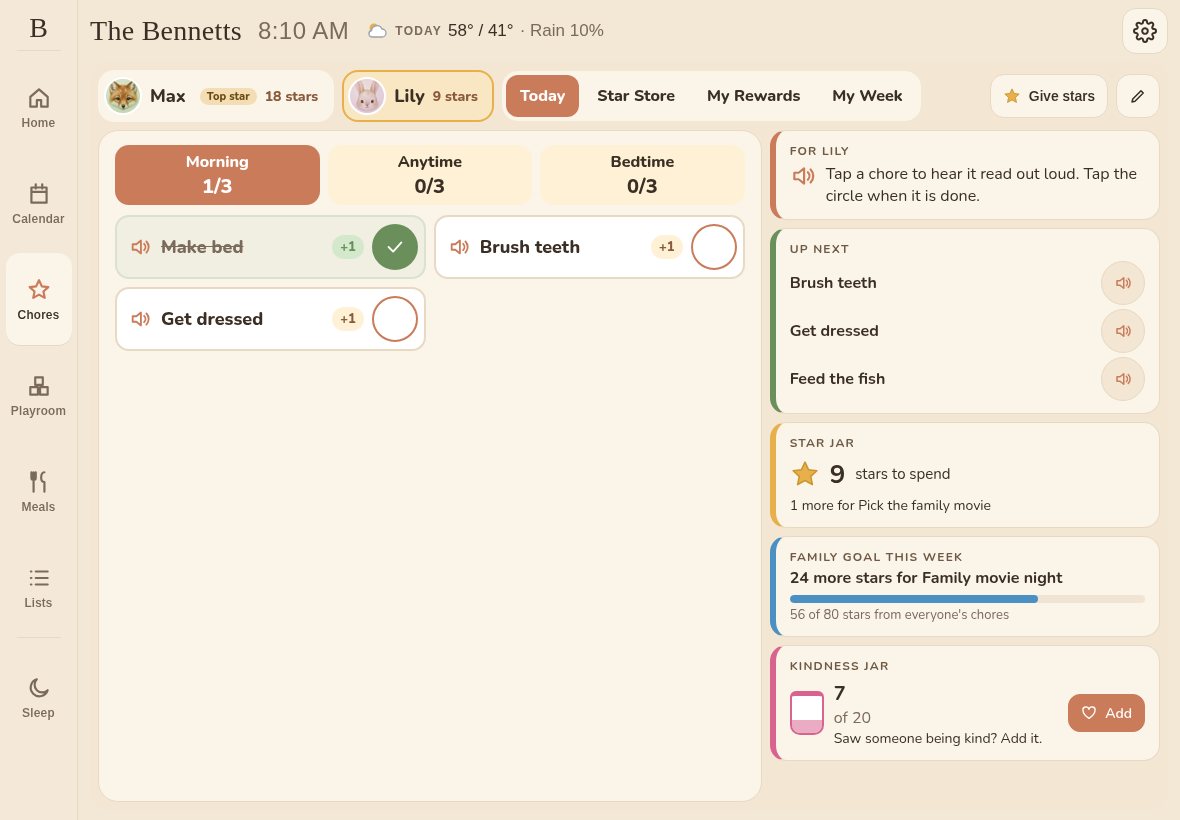
Chores for a young kid: tap a chore to hear it, tap the circle when done
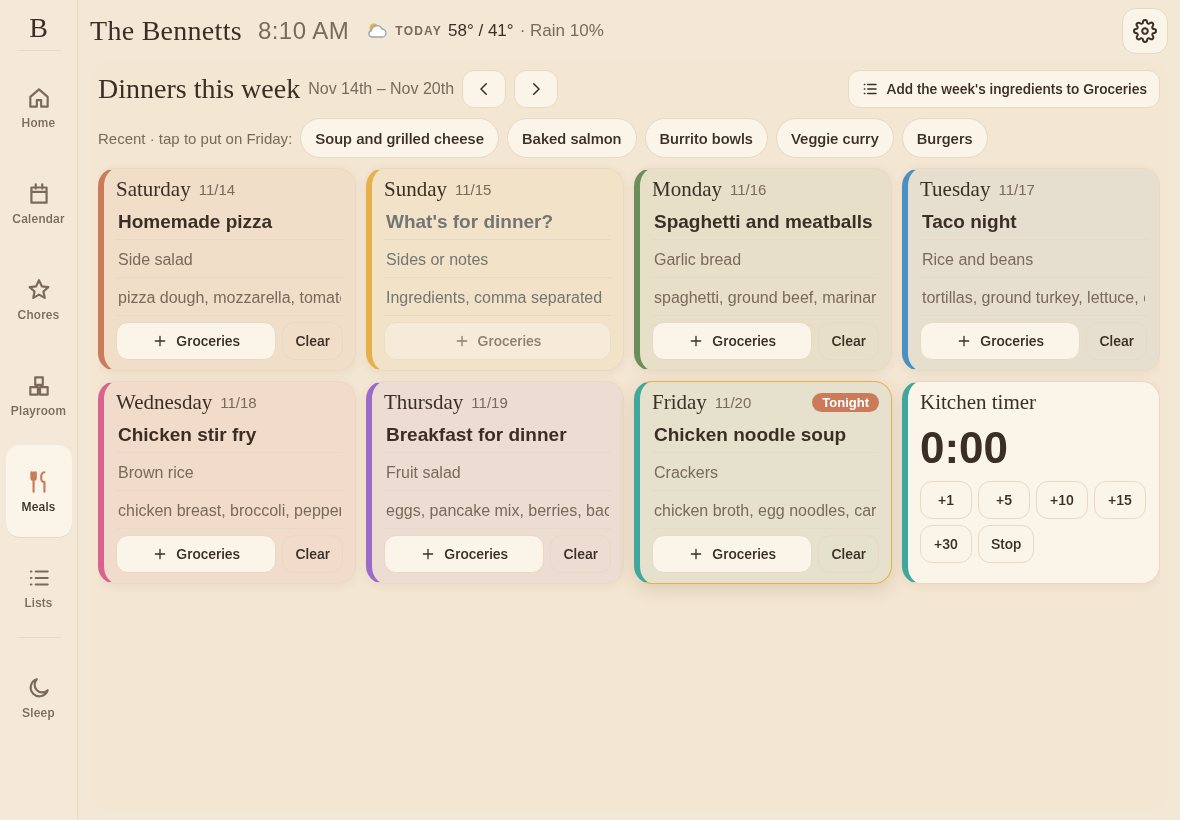
Meals tab: a typed dinner plan for the week, add ingredients to Groceries, and a kitchen timer
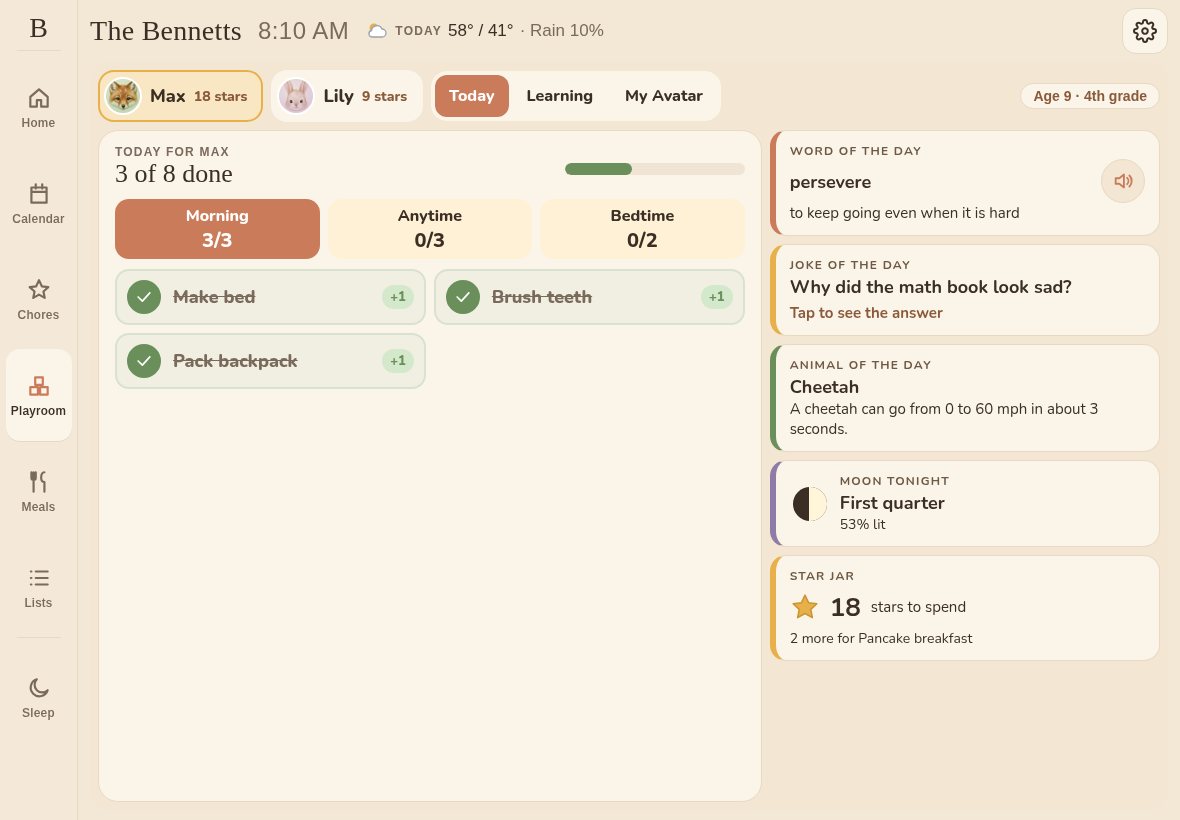
Playroom Today page with a big chore card, letter of the day, joke and animal of the day
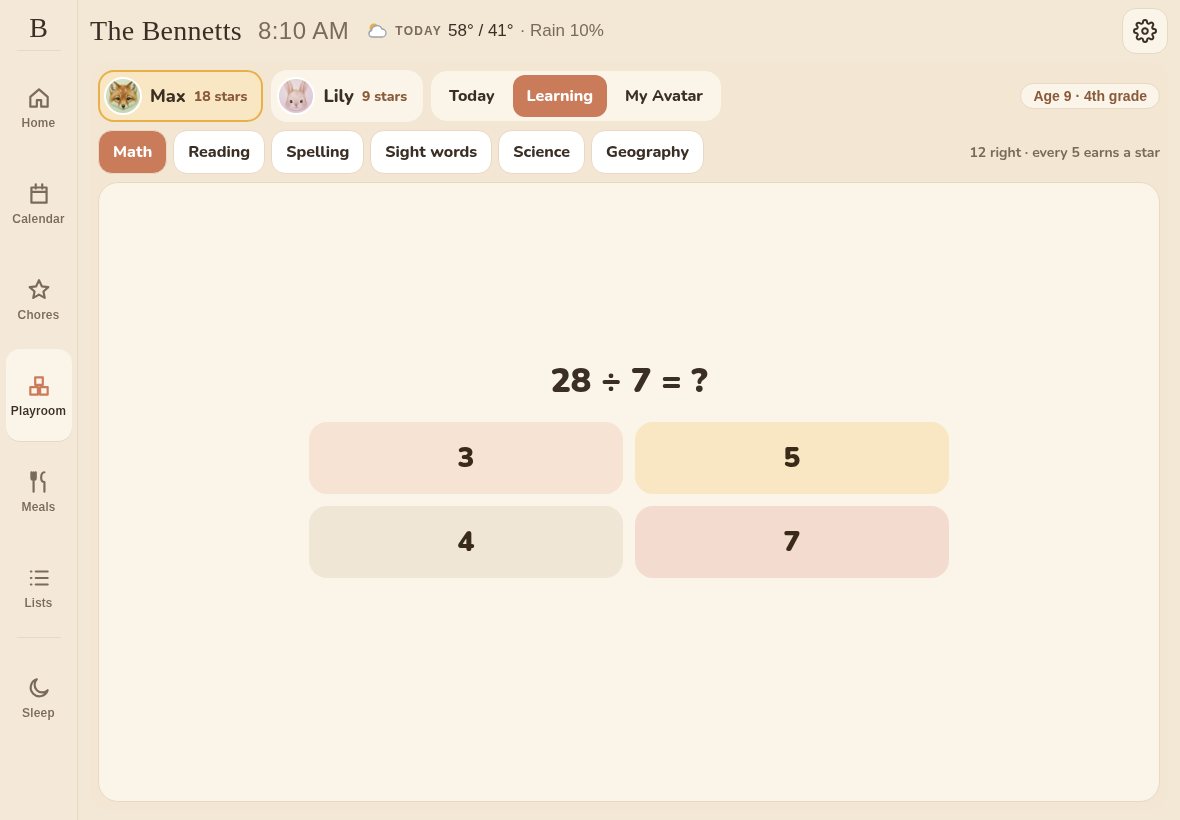
Learning games matched to a 4th grader: math, reading, spelling, science and geography
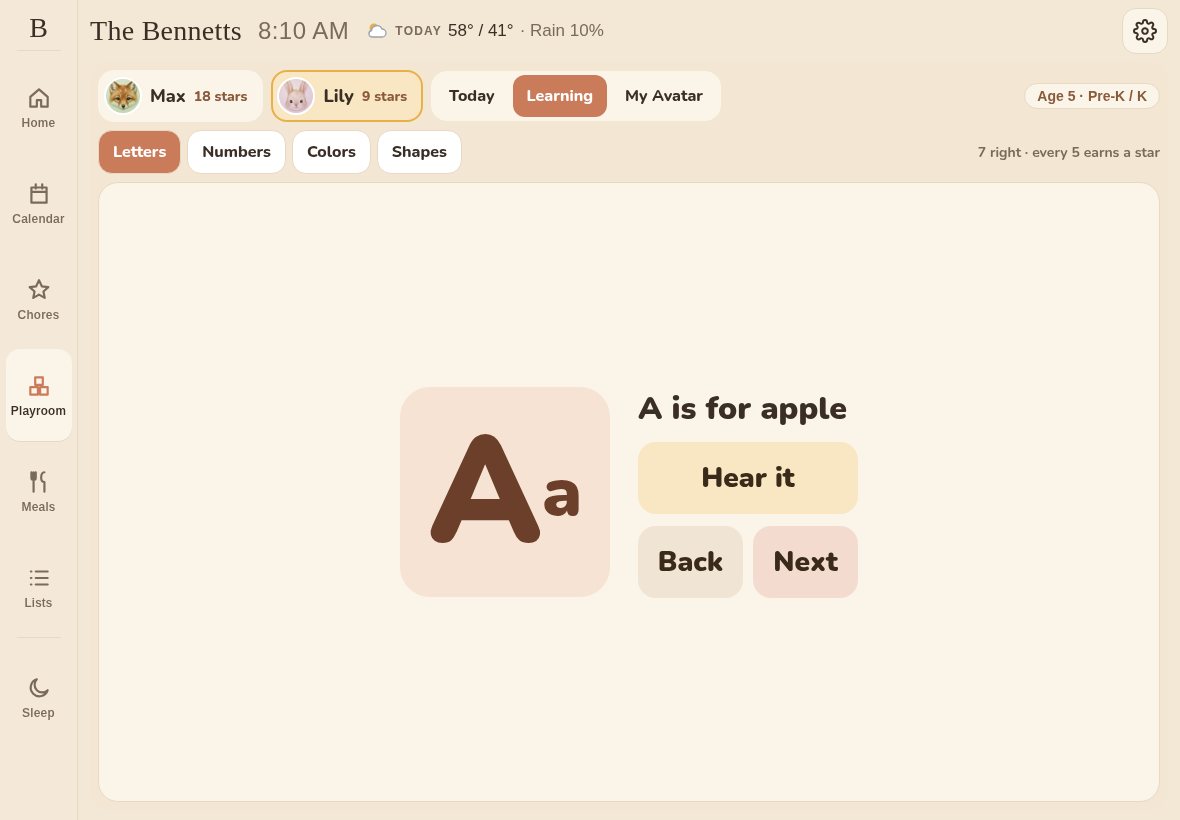
Pre-K learning: letters, numbers, colors and shapes
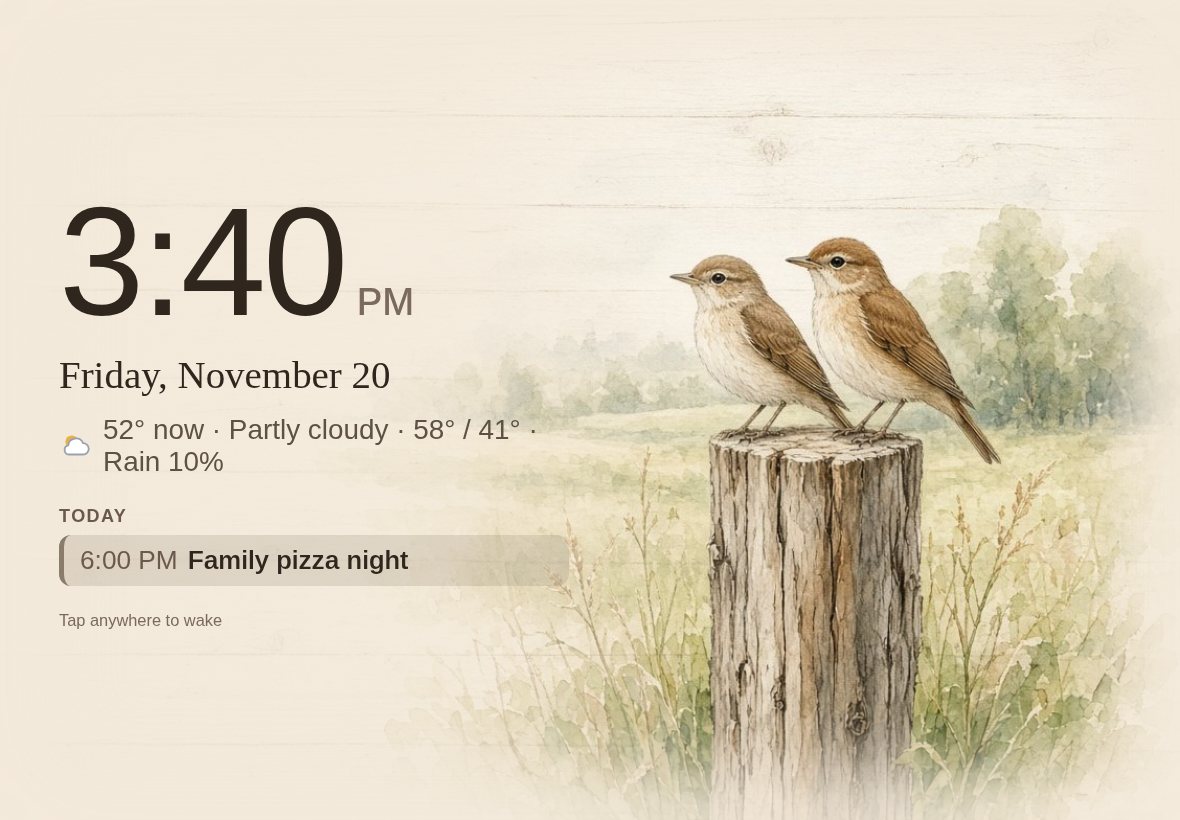
Sleep screen with farmhouse watercolor art that changes every day, a large clock, the weather and today's events

Swipe or tap the screen to see more. Example data for a fictional family.

Free for 7 daysTry it free for 7 days, then $19.99 once.
One time. No subscription. Ever.

Runs in the browser on the tablet you already have: iPad, Android or Fire.

Made for real kitchens

On the counter, from breakfast to bedtime.

A boy checks off his chores on a tablet on the kitchen counter while his mom makes breakfast
Morning choresKids see what's next and tap it done.
A girl taps the tablet in the Playroom while her dad watches
The PlayroomLearning games and a little fun, matched to each kid's age.
A mom holding her baby in a dim kitchen next to the tablet showing the sleep screen clock
A calm night screenA soft clock and today's events when the kitchen goes quiet.

Everything the family checks, on one screen

Built around the two things families use most: a shared calendar and the kids' daily routines. Made for an iPad in landscape, and it works on phones too.

Shared family calendar

Connect both parents' Google, Outlook or iCloud calendars with a private calendar link. Color-coded by person, with month and week views on the tablet and a day-by-day list on phones.

Chores, routines & rewards

Morning, anytime and bedtime checklists. Kids earn stars and trade them for rewards you choose. Little ones tap a chore to hear it read aloud, then tap the circle when it is done.

Dinners for the week

Type the week's dinners on the Meals tab, with sides and ingredients. Tonight's dinner shows on Home, one tap sends the ingredients to the Groceries list, and a kitchen timer sits right beside the plan.

Shared lists

A Groceries list and a To-do list everyone can add to, plus any other lists your family wants. Dinner ingredients from the Meals tab land on Groceries.

A playroom for each kid

A Today page with a big chore card, a word or letter of the day, a joke, an animal fact and the moon tonight, plus Learning games matched to each kid's age: Pre-K letters, numbers, colors and shapes up to math, reading, spelling, sight words, science and geography.

Weather for the week

Today's high and low, rain chance, a what-to-wear hint and a 7-day forecast strip along the bottom of Home.

A calm sleep screen

Farmhouse watercolor art that changes every day (skip any you don't like, or pin a favorite), with a big clock, today's weather and today's events.

Your colors

Pick a board theme and give every person their own color. Parents show as their initial on their color.

Read-aloud for little kids

Kids who are still learning to read hear their chores and the letter of the day out loud, using the voice built into the tablet.

Fills the whole screen

Laid out for a landscape iPad so the calendar, chores and forecast fit with no scrolling, and it rearranges itself on a phone.

Customize everything

No two families run the same way, so nothing is locked in.

Same idea, without the $300 screen

Dedicated wall displays are lovely, but they usually start around $300 and many add a monthly plan for the best features. If there's a tablet in a drawer, you already own the hardware.

Typical dedicated display

  • $300+ up front
  • Often a monthly plan for extras
  • Another device to buy and plug in

  • Try it free for 7 days, then $19.99 once.
  • No subscription, ever
  • Runs on the tablet you already have

How it works

Start your free trial

Try it free for 7 days, then $19.99 once.

Get your setup link

Enter your email. Your private setup link opens right away, with a QR code to open it on the tablet.

Set up the family

Add names and colors, paste your calendar links, and pick your chores, rewards and routines.

Open it on the tablet

Sign in on the tablet, add it to the home screen, and prop it up in the kitchen.

Trey Valasek on the deck of a Navy ship at sunset

About Us

Hi, I'm Trey Valasek. I've been active duty in the Navy for 11 years, and like most families, ours runs on a calendar that never stops: school, work, practices, and everything in between.

Barnwood Board started as a hobby. I built it for our own kitchen, on an old iPad, so everyone could see the day at a glance. It made our family life easier almost right away, and our kids love checking off chores and earning their stars. It turned out so well that I decided to share it.

I've put countless hours into it on nights and weekends while still serving my country, sweating the small details until every screen felt just right. AI helped with some of the coding along the way, but every feature, design choice, and finishing touch has been tested by my own family in our own kitchen.

My goal is simple: a high-quality family board with no subscription. I never wanted another monthly fee, and I don't think you do either. You pay once, and that's it. Most of what Barnwood earns goes back into keeping it running and making it better. This isn't about getting rich. It's about families enjoying it as much as I do.

Thanks for stopping by. I hope it brings a little calm to your kitchen too.

— Trey
FAQ

Is it really one time? No subscription?

Yes. Try it free for 7 days, then $19.99 once. No monthly fee, ever.

What tablet do I need?

Any reasonably recent tablet with a modern browser: iPad, Android or Amazon Fire. It's designed for landscape, roughly iPad size. An older iPad you no longer use is perfect.

Which calendars work?

Google Calendar, Outlook and iCloud. Each parent shares a private calendar link and events show up color-coded.

Can I change the chores and rewards?

Yes. Chores, routines, rewards, star values, colors, the dinner plan and each kid's learning level are all yours to set.

Do the little ones need to read?

No. Kids 7 and under can tap a chore to hear it read out loud, then tap the circle when it is done. Hearing a chore never checks it off by itself.

Can the kids mess anything up?

Kids use Chores and the Playroom. Settings live on their own page, away from the kids' screens.

Does it work on our phones too?

Yes, you can open the same login on a phone or computer, though it's built for a tablet on the counter.

Is our data private?

Your dashboard sits behind your own login, and calendars are read only through links you choose to share.

Give your tablet a new job

Try it free for 7 days, then $19.99 once.